|
||||||

Diary Events
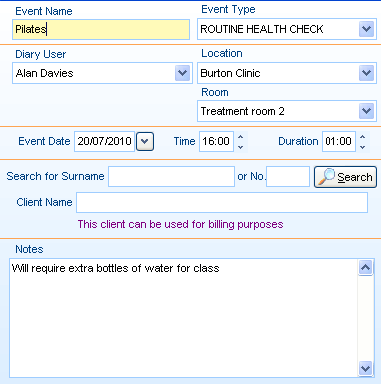
Event Details
'Event Name' is a free text box, and 'Event Type' is a drop down menu which uses the same information as the normal 'Appointment Type' menu for single appointments.
If an appointment slot has been highlighted before the event screen has been opened, the diary user will be selected automatically along with the date, time and duration - and possibly with the location and room if the practioners diary has been pre-defined with a specific location and room. Otherwise these can optionally be selected.
Client Billing
If a specific client is being charged for the event, then they can be selected and inputted into here. This is chosen if there is one person renting a room for their own purposes - If you running a class/event yourself, read below on how to add in each of your clients individually.
Notes
Notes can also be entered into the event the same manner as they are entered for appointment notes.
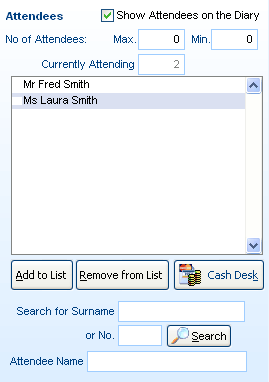
Adding Clients to an Event
The events screen offers the ability to add in multiple clients into a listed event, with the added benefit of choosing how to show this on the appointments diary itself. If ticked, the show attendees box enables each individual client to be shown under the event booking so a quick glance on the diary can show which clients will be due instead of going into the event itself for this information.
The minimum and maximum amount of attendees allowed into the list can optionally be chosen as well.
Client Billing (multiple)
After the client has been searched for and added to the list, they can then be charged by simply highlighting the client in particular, and then clicking on 'Cash Desk'.
This will bring up the standard PPS Cash Desk screen. If one client is being billed for the entire event, please refer to the previous section of this documentation entitled 'Client Billing (single)'.
Further Help & Information
If you need any further assistance, please call PPS support on 0845 0680 777 and go through to option 2. Alternatively, you can e-mail us at support@rushcliff.com
If you do not have a support contract and require further information, please contact PPS Sales on 0845 0680 777 and go through to option 1.
Become part of the PPS community and visit the PPS user forum - For PPS users, by PPS users!
The PPS Support Forum
Do you have a support contract with us? If so, check out our on-line help guides - easy step-by-step help and a range of answers to common questions.
Login to your account at https://www.rushcliff.com/support.php and take a look!
DISCLAIMER: This help documentation is offered on a “best intentions” basis. No responsibility is held by Rushcliff Ltd or it’s agents for the content, or for the advice given herein, or for the consequences or actions resulting in following the advice given in this help guide. This document may contain confidential information. The unauthorised use, disclosure or copying of this document or any of the information contained within it is strictly prohibited. Rushcliff Ltd PO Box 6406 Burton On Trent DE15 0XR. Registered in England and Wales, No. 4151443 VAT No. 488 9467 38. Registered office Basepoint Business & Innovation Centre, 110 Butterfield, Great Marlings, Luton, Bedfordshire, LU2 8DL.