|
||||||

Holding List
Overview
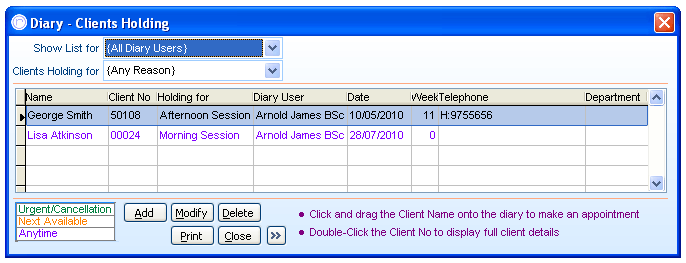
The PPS Appointments Diary has a holding list which provides a way of recording clients who are waiting for a future appointment slot or cancellation. Clients are simply added to the holding list, with a description of what they are holding for including their contact numbers and any client notes, whether this be a specific diary user, a particular location or a certain time slot (morning session, afternoon session, evening session) and so on - the last item mentioned will depend on if you use 'Slot Descriptions' on your appointments diary.
The list can be defined by each diary user and also what appointment time slot the clients are waiting for.
Appointments Diary
If there are clients on the holding list then the number of clients are displayed in a small yellow box along the top of the appointment diary screen. You can double click on the yellow
box, or click the "Holding" button to show the holding list.
Dragging and Dropping
The PPS system offers the ability to drag and drop appointments from the holding list onto the appointments diary - to do this, highlight the free appointment on the diary first then drag and drop
the appointment from the holding list onto the diary.
Adding a Client/Modify Clients Holding
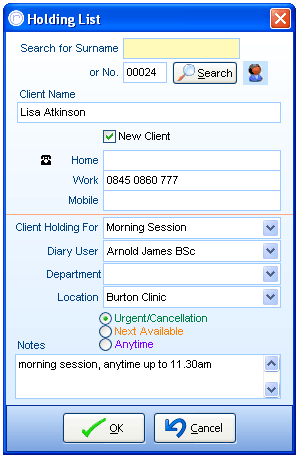
When adding a client, aside from selecting the client themselves and what type of appointment slot the client is waiting for - which defaults to 'Urgent/Cancellation' as standard, all fields are not mandatory. The telephone fields will become auto-filled if the client details screen holds this information.
The location option is the most useful none-mandatory field to choose if your PPS system runs over more than one practice location on the appointments diary. The notes field appears for any extra information, and is used in the same manner as any other appoinements based notes field.
Printing and More Details
Printing the holding list will result in all clients waiting for an appointment to be shown, alongside any details that have been entered into the actual waiting list.
Clicking on the more information arrow button '>>' will allow the holding list screen size to increase and also become resizable width ways.
Further Help & Information
If you need any further assistance, please call PPS support on 0845 0680 777 and go through to option 2. Alternatively, you can e-mail us at support@rushcliff.com
If you do not have a support contract and require further information, please contact PPS Sales on 0845 0680 777 and go through to option 1.
Become part of the PPS community and visit the PPS user forum - For PPS users, by PPS users!
The PPS Support Forum
Do you have a support contract with us? If so, check out our on-line help guides - easy step-by-step help and a range of answers to common questions.
Login to your account at https://www.rushcliff.com/support.php and take a look!
DISCLAIMER: This help documentation is offered on a “best intentions” basis. No responsibility is held by Rushcliff Ltd or it’s agents for the content, or for the advice given herein, or for the consequences or actions resulting in following the advice given in this help guide. This document may contain confidential information. The unauthorised use, disclosure or copying of this document or any of the information contained within it is strictly prohibited. Rushcliff Ltd PO Box 6406 Burton On Trent DE15 0XR. Registered in England and Wales, No. 4151443 VAT No. 488 9467 38. Registered office Basepoint Business & Innovation Centre, 110 Butterfield, Great Marlings, Luton, Bedfordshire, LU2 8DL.