|
||||||

Payments
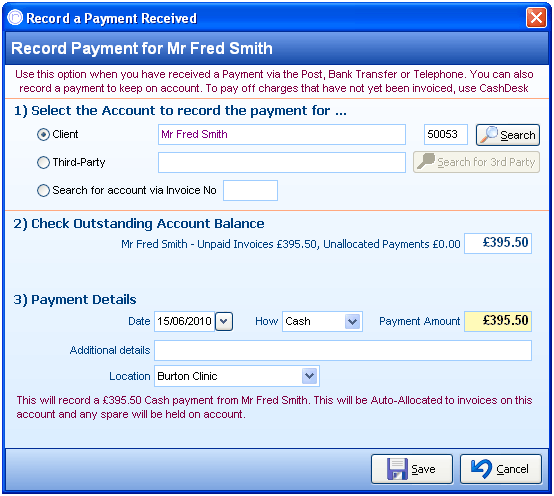
A Payment in PPS is recorded when money is received from clients or third parties. A payment must be allocated to an invoice – either immediately or in the future.
Selecting an Account
If no client is activiley selected before entering the payment screen, then a client or third party will have to be selected. Alternatively if you have a complete invoice number, this can be entered in, which in turn will select the appropriate client/third party account.
Check Oustanding Account Balanace
An entire outstanding balance of the full account is displayed here - Please take note that it shows not only unpaid invoices, but also any payments that have yet to be allocated.
Recording Payment Details
Date, payment type and amounts are recorded here. Additional details can be recorded if required. Location can optionally be selected, which is often a useful reporting tool.
If a payment recorded is the full balance owed on the account or of a higher value, it will be auto allocated from this screen. If the payment being made is of a lower value than what is fully owed, PPS will then bring up the payment allocation screen so than specific invoices can be paid off with the amount recorded.
Further Help & Information
If you need any further assistance, please call PPS support on 0845 0680 777 and go through to option 2. Alternatively, you can e-mail us at support@rushcliff.com
If you do not have a support contract and require further information, please contact PPS Sales on 0845 0680 777 and go through to option 1.
Become part of the PPS community and visit the PPS user forum - For PPS users, by PPS users!
The PPS Support Forum
Do you have a support contract with us? If so, check out our on-line help guides - easy step-by-step help and a range of answers to common questions.
Login to your account at https://www.rushcliff.com/support.php and take a look!
DISCLAIMER: This help documentation is offered on a “best intentions” basis. No responsibility is held by Rushcliff Ltd or it’s agents for the content, or for the advice given herein, or for the consequences or actions resulting in following the advice given in this help guide. This document may contain confidential information. The unauthorised use, disclosure or copying of this document or any of the information contained within it is strictly prohibited. Rushcliff Ltd PO Box 6406 Burton On Trent DE15 0XR. Registered in England and Wales, No. 4151443 VAT No. 488 9467 38. Registered office Basepoint Business & Innovation Centre, 110 Butterfield, Great Marlings, Luton, Bedfordshire, LU2 8DL.